
June 14, 2026
Restaurant Digital Transformation Guide: Moving to Online Ordering, POS and QR Menus
Restaurant digital transformation is the process of moving order taking, payments, kitchen flow, menu updates and customer relationships onto a single connected system. Most operators start this journey in pieces: a QR menu first, then a separate marketplace account, then an old-style POS with a receipt printer. The result is three or four tools that don't talk to each other, each with its own dashboard, its own cost and its own headache. This guide shows how to move forward in the right order with a single-platform mindset instead of starting out scattered.
Here is the real issue. A business like Joe's Burgers that takes 60 delivery orders a day, if it funnels all of those orders through marketplaces like Uber Eats and Deliveroo, is paying somewhere between 15 and 35 percent commission on every single order. On an average ticket and a monthly order volume in the thousands, the commission line alone can climb into tens of thousands of dollars a month. The first goal of digital transformation is not to shut that channel down. It is to put your own commission-free ordering channel next to it and migrate your loyal customers there.
Below we break digital transformation into five layers: your own branded online ordering site and app, order tickets and cloud POS on the floor and at the register, a QR menu on the table, loyalty and promotions for repeat customers, and on top of all of it, cloud reports. Where you should start depends on your biggest pain point today. Let's go through them in order.
Before you digitize: map out where you stand
Before getting in line, take an inventory. Where do orders come from today? For a cafe called Corner Coffee, the breakdown looked like this: phone-in delivery orders, walk-in pickup, dine-in table service, and three separate marketplace apps. Each of those four channels had its own rules, its own commission and its own ledger. When staff closed out the register at night, they added up numbers from four different places by hand.
Second, write down the real cost. Not just the marketplace commission, but lost order tickets, mis-entered orders, slips that reach the kitchen late, and out-of-stock items still showing on the menu. Corner Coffee was dealing with about a dozen wrong or cancelled orders a week, and most of them came from handwritten tickets the kitchen couldn't read.
The third step is setting a target. The goal is not to drop the marketplace overnight. A realistic target is moving 30 to 40 percent of delivery orders onto your own commission-free channel in the first six months. To hit that, you have to show customers that ordering from your own site is faster, more rewarding and earns loyalty points.
Step 1: Set up your own commission-free online ordering channel

The backbone of digital transformation is the commission-free online ordering site and mobile app you launch under your own brand. On a marketplace, the customer remembers the platform, not you. On your own channel, your domain, logo, colors and customer data stay with you. When Joe's Burgers launched its own site, it texted the link to regulars who had previously ordered through the marketplace and offered 10 percent off the first order. Within two months, 35 percent of delivery revenue had shifted to the owned site.
When you set up the ordering channel, get three things straight: delivery zones, online payments and the digital menu. Defining delivery zones means no orders drop in from neighborhoods your driver won't reach; the minimum basket and the delivery fee per zone are calculated automatically. Online payment reduces the cash-at-the-door hassle and lowers no-show risk.
Separate your order types from the start, too. The same system can manage delivery, pickup and dine-in ordering. A customer can order delivery from home, pickup from the office, or order via QR at a table on the weekend; all three land in the same dashboard and the same kitchen screen. For an industry-specific setup, look at the examples on the restaurants or coffee shops pages.
Step 2: Connect the floor and the register with cloud POS
The online channel isn't enough on its own. The order tickets running on the floor, opening and closing tables, the register and the kitchen flow all have to connect to the same system. This is where order tickets and cloud POS come in. A server enters the order from a tablet at the table or from the order-taking app, the ticket is created instantly, and the register and kitchen see it at the same moment. Paper tickets getting lost, being unreadable or entered twice stop being a problem.
Being cloud-based is critical. With an old-style local POS, the data lives only on that one device; if the device breaks or the internet goes down, work stops, and to pull a report you have to walk over to the register. With a cloud POS, revenue, table occupancy and product sales open from anywhere. When the two-location Corner Coffee opened its second site, it began managing both locations from a single dashboard and pushed menu and price changes to both from one place.
If the order ticket concept is new to you, the what is an order ticket article explains the basic logic; what to look for when choosing a register and POS is covered in detail in the restaurant order ticket and POS system guide. The right POS is the foundation that carries the rest of your digital transformation.
Step 3: Drop paper menus with a QR menu on the table
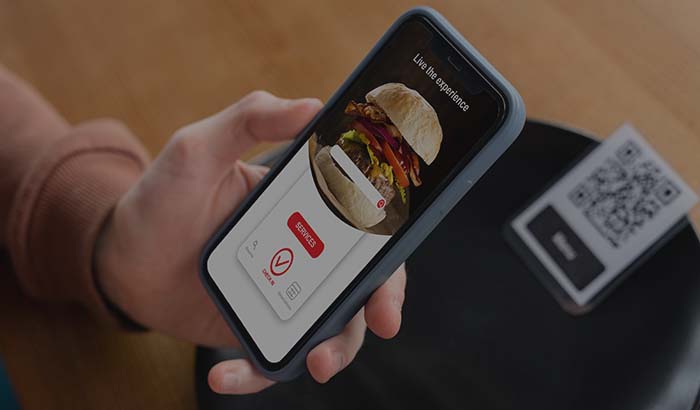
The QR e-menu is the digital side of the dine-in experience. The customer scans the code at the table, sees the current menu on their phone, and can order from it if they want. The cost of printing paper menus, the hassle of reprinting when prices change, and the worn-out look of old menus all disappear. You can mark an out-of-stock item inactive with one tap, the customer won't ask for something you don't have, and the server doesn't have to say 'we're out of that.'
The real power of a QR menu shows when it joins ordering and the kitchen. A QR order placed from the table goes straight to the kitchen display screen; the server doesn't have to re-enter the order at the register. On a busy Saturday night at Joe's Burgers, service time per server dropped, because the burden of entering tickets was spread across the customer and the system.
You can find what a QR menu is and how to set one up in the what is a QR menu article. Menu images, category order and photo quality directly affect average order value; a well-organized digital menu makes cross-selling easier.
Step 4: Bring order to the kitchen flow with a KDS
No matter which channel an order comes from, it ends up in the kitchen. The kitchen display system (KDS) uses a screen instead of a printed receipt; online orders, QR orders and server tickets line up in a single list, sorted by preparation order. No tickets get lost, no ink runs out, and the same order isn't cooked twice.
A KDS also measures prep times. Which item is running late, what hour the kitchen jams up, you see this in the data. Corner Coffee noticed from its KDS report that the sandwich station was the bottleneck during the lunch rush and added a second pair of hands for that hour; average prep time dropped from 9 minutes to 6.
We explain the logic and setup of the kitchen display in detail in the what is a KDS kitchen display system article. A KDS becomes almost mandatory if you take orders across multiple channels, because keeping three or four channels synchronized by hand simply isn't possible.
Step 5: Loyalty, promotions and bringing customers back
The most profitable part of digital transformation is bringing back a customer you've already won. With loyalty and promotions, customers earn points on every order, you set up birthday discounts and you send campaigns to dormant customers. On a marketplace, the customer data belongs to the platform; on your own channel the phone number, order history and preferences are yours, which is what makes this possible.
Let's look at a concrete setup. Joe's Burgers ran a 'buy 5, get 1 meal free' campaign in its own app. It gave the customer a clear reason to return to the owned site rather than the marketplace, because points only worked on the owned channel. Within three months the repeat order rate rose and annual value per customer increased.
You can add online reservations alongside loyalty. For dine-in-heavy businesses, table reservations, no-show tracking and occupancy management are a complementary piece of digital transformation. When all these channels merge into the same customer profile, who orders what and how often becomes clear.
Step 6: See your profit with reports, inventory and cost
Once you've connected every channel, you end up with a single pool of data. With cloud reports you see revenue, sales by product, channel breakdown, hourly volume and staff performance from your phone. The owner of Corner Coffee can close the day from anywhere instead of waiting at the register in the evening, and places the next day's orders accordingly.
Recipe and cost tracking is the core of profitability. If you tie a burger's ingredient cost to its recipe, you see the profit margin instantly when the selling price drops or the supply price rises. The cloud back office lets you manage menu, price, stock and user permissions from one place; in a two-location business you apply the same change everywhere at once.
At the end of digital transformation, the real gain is making decisions with data instead of gut feel. Which product sells at a low margin, which channel is eating into profit because of commission, which hour goes empty; all of it shows up in the reports. You can see the real cost difference between marketplace commission and your own channel, with the numbers, in the marketplace commission vs. your own site comparison article.
Where to start: the order based on your business
There's no single right order; start with your biggest pain. If most of your delivery revenue comes from the marketplace and commission is hurting, open your commission-free online ordering channel first. If the real problem is paper-ticket chaos and lost orders on the floor, move to cloud POS and order tickets first. If the problem is the menu and table service, a QR menu can be the first step.
Wherever you start, the key is gathering everything on a single platform. When you buy a separate QR menu, a separate POS and a separate ordering site, the integration headache and double data entry come right back. In a single system, online ordering, POS, QR menu, KDS, loyalty and reports come already connected to each other. You can find the full picture of moving to a commission-free channel in the commission-free online ordering system guide.
The most practical way to start is to try it. With a free trial you set the system up with your own menu and test it with real orders; you can compare packages by scale and features on the pricing page. Start small first, get one channel working, then add the next.
Key takeaways
- Gather digital transformation onto a single connected platform: a separate QR menu, separate POS and separate ordering site create double data entry and integration headaches.
- The first goal is not to shut down the marketplace but to put your own commission-free channel next to it and migrate loyal customers there; moving 30 to 40 percent of delivery revenue in the first six months is a realistic target.
- When cloud POS, online ordering, QR menu and the kitchen display connect to the same system, an order lands on a single kitchen screen no matter which channel it came from, and the need for manual syncing ends.
- Because loyalty and customer data stay on your own channel, you can raise the repeat order rate and the value per customer.
- With recipes, cost and cloud reports you make decisions with data instead of gut feel, and you see which channel and which product is actually profitable.
Frequently asked questions
Where should I start with restaurant digital transformation?+
Start with your biggest pain. If the commission burden is hurting, open your own commission-free online ordering channel first. If there's paper-ticket chaos on the floor, move to cloud POS and order tickets first. If the menu and table service are the issue, a QR menu can be the first step. What matters is gathering all channels onto a single platform.
Do I have to drop marketplace apps entirely?+
No. Marketplaces can stay useful for winning new customers. The goal is to migrate loyal, repeat customers to your own commission-free channel, so you drop the 15 to 35 percent commission you pay on every order down to zero on those orders.
What is the difference between cloud POS and an old-style local POS?+
On a local POS the data lives only on that one device; if it breaks or the internet goes down, work stalls and you have to walk to the register for a report. With cloud POS, revenue, table occupancy and sales open from anywhere, you manage multiple locations from one dashboard, and you push a menu change to all locations from a single place.
Is a QR menu just for viewing the menu, or does it take orders too?+
It does both. The customer can scan the code at the table to see the current menu, and order directly if they want. The QR order goes to the kitchen display and the server doesn't have to re-enter it at the register.
How long does it take for the cost of digital transformation to pay off?+
For most businesses, the return is calculated from the savings on marketplace commission. Moving even a portion of your orders to your own channel can create a difference of tens of thousands per month. For a precise figure, the most reliable approach is to test it with your own menu using a free trial.
Should I get all these features in a single system or separately?+
Getting them in a single system is far healthier. Online ordering, cloud POS, QR menu, kitchen display, loyalty and reports come already connected on a single platform. When you buy separate tools, you run into integration problems, double data entry and dashboards that don't talk to each other.
Stop paying commission on your orders
Launch your own commission-free online ordering system with RestApp.