

May 21, 2026
What Is a QR Menu (E-Menu)? How It Works and Ordering at the Table With QR
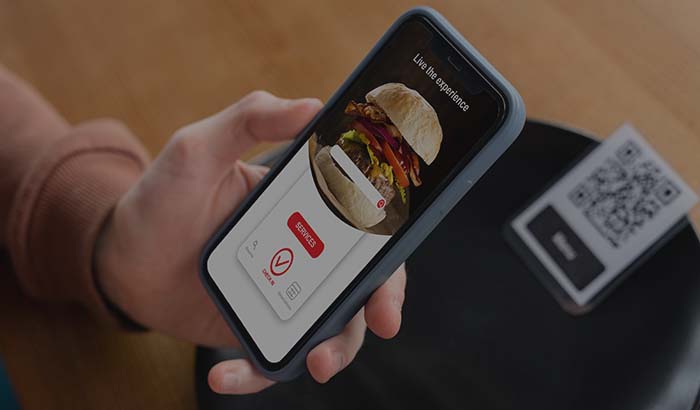
A QR menu is a system where a restaurant or cafe presents its menu digitally behind a square code (QR code) placed on the table. When a guest points their phone camera at the code, the menu opens in the browser; product photos, descriptions, prices and, where available, allergen information appear on screen. It is also known as an e-menu, and at its core it is the digital version of the printed menu, one that can be updated at any moment and can also take orders. RestApp's QR e-menu solution does exactly this: a live menu that works without printing laminated menus and without reprinting the menu every time a price changes.
What sets a QR menu apart from an ordinary PDF menu is that it does not just display, it can also take orders. A guest scans the code on the table at Corner Coffee, adds a latte and a cheesecake to the cart, writes a note and sends the order to the table. That order drops into the kitchen and onto the order ticket (POS); the loop where a waiter comes to the table, takes the note, runs to the kitchen and comes back is shortened. On the RestApp side, dine-in, pickup and delivery are all managed from the same infrastructure.
The most critical aspect of a QR menu for a restaurant is cost and channel. On every order coming through a marketplace such as Uber Eats or Deliveroo, you pay a commission of roughly 15 to 35 percent. An order taken through the QR menu on the table, however, is your own channel; there is no marketplace in between, and it works on the logic of commission-free online ordering. In this article we explain with examples what a QR menu is, how it works, how ordering at the table with QR progresses, and why updating prices becomes so easy.
QR Menu (E-Menu)
A QR menu is a digital menu that opens by scanning a square code on the table with a phone camera; the guest sees the products, adds them to the cart and, in most systems, can place an order and pay without waiting for a waiter. It is the digital, instantly updatable version of the printed menu that can also take orders.
How does a QR menu work?
The way it works comes down to three steps. First, a QR code specific to each table is placed on it; it can be a sticker, a standing display or a card matched to the table number. When the guest points their phone camera at the code, the menu opens directly in the browser without having to download a separate app. When the code on table 7 at Joe's Burgers is scanned, the system knows this is table 7, because the code is assigned to that table.

The screen that opens shows categories, products, photos and current prices. The guest selects a product, sets the options if any (spicy/mild, extra cheese, portion size), increases the quantity and adds it to the cart. At this point there are two scenarios: some businesses use the QR menu only to display the menu, while others let it take the order and the payment from this screen as well. Both are possible in RestApp, and the digital menu infrastructure is used to manage products from a single place.
When the order is sent, the information reaches the business instantly. The order drops onto the kitchen display system (KDS) and the order ticket, it is clear which table it came from, and the kitchen starts preparing it. The waiter does not carry handwritten slips, the kitchen sees the order legibly, and the table number does not get mixed up. The real strength of a QR menu is that, more than displaying the menu, it digitizes this order flow.
How does ordering at the table with QR progress?
In the classic flow the waiter comes to the table, takes the note, relays it to the kitchen, brings the drinks, writes up the bill and takes the payment. During busy hours this loop gets clogged and the guest waits to call the waiter over. Ordering at the table with QR opens this bottleneck: the guest places the order from their own phone when they are ready, and when they want an extra item they add it from the same code without calling the waiter again. At Corner Coffee, a guest seated at the table adds a second coffee from the QR without waiting for anyone, and the order drops straight to the barista screen.
This flow does not eliminate the waiter, it lightens their work. Instead of taking order notes, the waiter focuses on service, attending to tables and welcoming guests. Because the order information comes directly from the system, errors caused by a wrongly entered item, a missed note or unreadable handwriting decrease. On the RestApp side, different order types are defined for dine-in, pickup and delivery; the table QR flow is managed through the dine-in ordering type.
The payment side can be tied to the table as well. Some businesses have the guest pay the bill to the waiter, while others close it at the table from the QR screen with online payments. When the guest finishes eating, they see the bill on their phone and pay by card, the table empties quickly, and at the end of the day the cash and the order tickets reconcile. During a busy lunch service, increasing table turnover means seating more guests from the same dining room.
Why is updating prices and the menu so easy?
To change a price on a printed menu you have to redesign the menu, send it to print, redo the lamination and distribute it to the tables. When the cost of an ingredient rises or a product runs out, the menu stays out of date; the guest gets hung up on the difference between the price they saw on the menu and the price they hear at the register. With a QR menu the price is changed from a single panel and the change takes effect on all tables that very moment. Joe's Burgers updates a price increase from the panel in the morning, and by noon the new price shows on every code that is scanned.
The same ease applies to product and campaign management. You set a sold-out product to inactive with one tap, the guest cannot order an item that is not there, and the cancellation traffic with the kitchen ends. You can show and hide the menu of the day, a seasonal product or a category specific to breakfast hours at set times. All these settings are made through the cloud back office and managed centrally without branch differences.
Campaigns and discounts shown on the menu also go live instantly because they are digital. You define setups such as a discount on the second coffee or a free dessert above a certain amount on the loyalty and promotions side and make them visible on the QR menu. You can track which product was ordered how much and at what hour demand peaked from the cloud reports screen and arrange the menu accordingly.
The relationship between QR menu and commission-free ordering
The most important point restaurants overlook when moving to a QR menu is the channel. On an order coming through a marketplace such as Uber Eats or Deliveroo, 15 to 35 percent of the product price goes to the marketplace as commission. In a business doing 1,000 orders a month with an average ticket of around $10, revenue comes to $10,000; at a 25 percent commission, $2,500 of that goes to commission. An order taken from the QR menu on the table, however, is your own channel, with no marketplace and no commission in between.
Here the QR menu creates a commission-free channel not just for dine-in but for delivery and pickup as well. The guest scans the code in the restaurant and pays their bill through your channel; the same infrastructure works together with your own branded commission-free online ordering site and mobile app. You do not have to abandon the marketplace entirely, but pulling the orders from your dine-in and loyal customers into your own commission-free channel goes straight to profit. You can also look at our commission-free online ordering guide, which explains this logic in more depth.
If you want to compare marketplace commission against your own channel cost with concrete figures, the marketplace commission vs your own site article covers this topic with examples. QR menu, e-menu and commission-free ordering are parts of the same whole: it is the way to offer the guest a good menu experience while keeping the order in your own channel rather than losing it to the marketplace. You can see RestApp's prices and plans on the pricing page and try the setup with try now.
Key takeaways
- A QR menu is a digital menu that opens by scanning the square code on the table with a phone; it displays products and, in most systems, also takes the order and the payment.
- Ordering at the table with QR shortens the waiter's note-taking loop; the order drops directly onto the order ticket and the kitchen display system (KDS), and errors decrease.
- Price and menu changes are made from a single panel and take effect on all tables instantly; the need to reprint the menu disappears.
- Settings such as setting a sold-out product to inactive, hourly menus and campaign displays are managed centrally from the cloud back office.
- An order taken from the QR menu on the table is your own channel; it works commission-free, without the 15 to 35 percent commission of marketplaces like Uber Eats and Deliveroo.
Frequently asked questions
What is a QR menu?+
A QR menu is a system where a restaurant or cafe presents its menu digitally behind a square code (QR code) placed on the table. When the guest points their phone camera at the code, the menu opens in the browser; they see the products, add them to the cart and, in most systems, can place an order and pay without waiting for a waiter. It is also known as an e-menu.
Are a QR menu and an e-menu the same thing?+
Yes, they are two names for the same thing. E-menu refers to the electronic version of the menu; QR menu emphasizes that access to this digital menu is provided through the square code on the table. In practice both mean a digital menu that opens on the phone and can be updated instantly.
Does the guest need to download an app for a QR menu?+
No. When the QR code is scanned with the phone camera, the menu opens directly in the browser, with no separate app to download. This is the most practical side of a QR menu; the guest reaches the menu the moment they look at the code.
How does an order placed at the table with QR reach the kitchen?+
When the guest sends the order, the information is relayed to the business instantly. The order drops onto the order ticket and the kitchen display system (KDS) along with which table it came from, and the kitchen starts preparing it. Because the waiter does not carry handwritten slips, errors from misreading and missed items decrease.
How are prices updated on a QR menu?+
The price is changed from a single management panel and the change takes effect on all scanned codes that very moment. Unlike a printed menu, there is no redesign, printing or lamination needed. Setting a sold-out product to inactive and showing a campaign are also done instantly from the same panel.
Is taking orders with a QR menu commission-free?+
An order taken from the QR menu on the table is your own channel, with no marketplace such as Uber Eats or Deliveroo in between. The 15 to 35 percent commission paid on those channels does not arise on these orders, meaning the revenue stays directly with the business.
Stop paying commission on your orders
Launch your own commission-free online ordering system with RestApp.