


April 22, 2026
Online Ordering for Grocery Stores and Corner Shops: Commission-Free Sales, Stock and Delivery
If you run a neighborhood grocery store or a corner shop, the headache comes down to one thing: thousands of products, stock that changes constantly and customers calling to ask "do you have this in?". On top of that, marketplace apps take a 15 to 30 percent cut on every basket. Food margins are already thin, so that commission comes straight out of your pocket. The fix is not to be more visible on the marketplace, it is to build a channel that works under your own name.
RestApp built commission-free online ordering for grocery stores and shops for exactly this reason. You get an ordering site and app under your own brand, the customer fills the cart and pays, and you hand over zero commission. Even with thousands of products, a categorized digital menu keeps everything organized, so customers drop what they need into the cart in seconds.
In this guide we cover online ordering for grocery stores and shops from start to finish: how to manage a large product catalog, how to track stock, how to set delivery zones, how to build a fast cart experience, and what the commission-free model adds to your business in concrete numbers. See the online ordering system for markets and stores for the full picture.
Why marketplace commission sinks a grocery store
A case of water, a pack of pasta, a few pieces of fruit. The average grocery basket is smaller than a restaurant order, and the margin is even tighter. When a marketplace app takes 25 percent of that basket, a large share of the sale disappears. Yet your net profit on those items is already razor thin. On some lines, the commission eats your entire margin.
Picture a neighborhood grocery store taking 600 online orders a month with an average basket near the low end of your typical ticket. At a 22 percent marketplace commission, the monthly deduction runs into the thousands. Move that same volume to your own commission-free channel and all of it stays with you. Over a year that adds up to more than a full staff salary.
The marketplace also keeps you from getting to know your customer. The person who ordered thinks they bought from "some app" and does not remember your store's name. With commission-free online ordering, the customer buys directly from you, their phone number and address stay with you, and it is up to you to invite them back for a second order.
Turning thousands of products into a categorized catalog
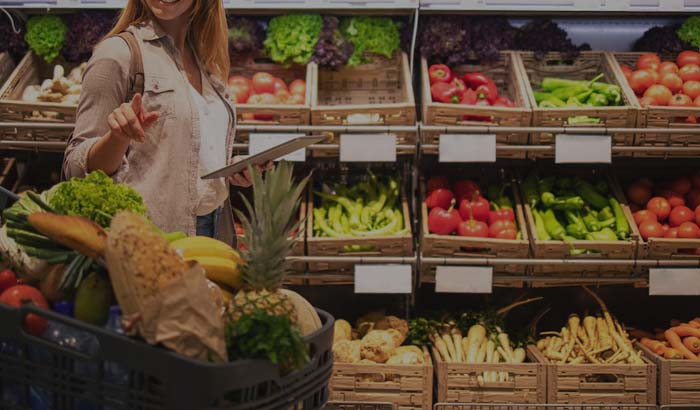

The biggest difference in a grocery store is the sheer number of products. A restaurant might have 60 items; a grocery store can have 2,000. RestApp's digital menu structure is built for exactly this scale. You create categories like drinks, snacks, cleaning, breakfast and produce, and add a photo, price, weight and variants to each product. Customers browse by category or type "eggs" into the search box and find it instantly.
Bulk product import means you do not have to type thousands of items by hand one at a time. Price updates also work at the category level, so when costs rise you select the relevant group and edit them all at once. Because barcoded products share the same catalog with your POS and cloud POS, the register and the online storefront always show the same data.
Bringing the aisle logic into the digital world is comfortable for customers too. Several items go into the cart quickly, so abandonment drops. One-tap reordering from past orders is a real convenience for the weekly staples grocery shoppers buy again and again, and it builds loyalty.
Stock tracking: don't sell what you don't have
The most frustrating moment in a grocery store is when the product a customer ordered is out of stock in the back. Then come the phone calls, the cancellations and the refunds, and you lose the customer. With RestApp's cloud back office, you define stock quantities, and when an item runs out it automatically closes for sale on the online storefront or shows as "sold out".
As sales come in, stock counts down, and you get an alert for products that hit a critical level. That way you plan what to order and when based on data, not guesswork. Seeing which items move fast also helps you improve shelf layout and supply frequency.
With cloud reports, you watch which category is turning over, which hours are busiest and your top sellers on a single screen. Because you can check it from your phone, you keep a finger on the pulse even when you are not behind the counter. It also makes it easier to weed out slow sellers that just take up shelf space.
Delivery zones and courier management
Delivery is the lifeline of a grocery order. Promising the wrong zone and failing to make it on time, or sending a courier too far, eats into profit. In RestApp, you draw delivery zones on a map. You set a separate minimum basket amount, delivery fee and estimated time for each zone. Customers outside your zones cannot order, so you can always deliver on the service you promise.
You can build flexible rules like free delivery to the nearest streets and a small delivery fee a bit farther out. Setting free delivery above a certain basket amount is also a way to raise your average basket. Because you set these rules yourself, you are not stuck with the conditions a marketplace dictates.
Incoming orders are managed in one flow through the order taking app, you hand the prepared package to the courier, and the customer tracks the status. If a customer prefers to come by the store and pick it up, you can also turn on the pickup ordering option, so you sell online without any delivery load at all.
A fast cart and smooth online payment
A grocery customer buys many items and has little patience. If filling the cart is a hassle, they abandon the shop halfway. In RestApp, quick add with plus and minus quantity inside a category, search and reorder from past orders are built for exactly this speed. A customer finishes a 30-item shop in a few minutes.
On the payment side, with online payments the customer pays upfront by card, the money lands in your account, and the hassle of making change at the door disappears. You can also keep cash on delivery or card on delivery open and leave the choice to the customer. Once collection is settled, the risk of cancellations and fake orders drops too.
Because the whole experience happens inside your own branded site and app, the customer builds a bond with you. With loyalty and promotions tools, a customer who earns points and gets discount coupons comes back to you, not the marketplace. With a regular grocery shopper, loyalty is your most valuable card.
How long does it take to set up RestApp in a grocery store?
You need no technical knowledge to get set up. You start with a free trial, create your categories, enter your products and draw your delivery zones. Bulk import and copy shortcuts speed up a large catalog, so a small grocery store is ready to go live in a few days.
The cost is clear too. The pricing page shows fixed monthly plans with no per-order commission. Because you pay no commission as you sell, the more your volume grows the more of that revenue stays with you. The gap with the marketplace is felt in your pocket from the very first month.
To fully digitize your store, our restaurant digitalization guide lays out the general framework. If you want to dig deeper into the commission comparison, the article marketplace commission or your own channel is exactly for you. Together they show in numbers why your own channel makes more sense.
Key takeaways
- Marketplaces take 15 to 30 percent commission, which can eat your entire margin on thin-margin grocery items; your own commission-free channel keeps that money in your pocket.
- Thousands of products are managed neatly with a categorized digital menu and bulk import; the POS register and online storefront share the same catalog.
- Define stock in the cloud back office; out-of-stock items close for sale automatically, and critical-level alerts make resupply easier.
- Draw delivery zones on a map and set a separate minimum basket and fee for each zone; sell without delivery using pickup.
- A fast cart, online payment and loyalty points keep the regular grocery shopper tied to you, not the marketplace.
Frequently asked questions
Does the online ordering system for grocery stores and shops charge commission?+
RestApp charges no per-order commission. You pay a fixed monthly plan, and every order from your own site and app is commission-free. The 15 to 30 percent commission a marketplace would take stays entirely with you, which makes a real difference in thin-margin food sales.
How do I enter thousands of products into the system?+
With the categorized digital menu structure and bulk product import, you can add thousands of items without typing each one by hand. You can update prices in bulk at the category level and manage your barcoded products from the same catalog as your POS register.
What happens when a product runs out of stock?+
You define stock quantities in the cloud back office. As sales come in, stock counts down, and when an item runs out it automatically closes for sale on the online storefront or shows as sold out. You get an alert for products that hit a critical level and plan what to order and when based on data.
Can I set my own delivery zones and fees?+
Yes. You draw delivery zones on a map and set a separate minimum basket amount, delivery fee and estimated time for each zone. You can raise your average basket with rules like free delivery above a certain amount. Orders from outside your zones are not accepted.
How long does setup take, and do I need technical knowledge?+
No technical knowledge is needed. You start with a free trial, create your categories, enter your products and draw your delivery zones. With bulk import shortcuts, a small grocery store is ready to go live in a few days.
Stop paying commission on your orders
Launch your own commission-free online ordering system with RestApp.