

April 13, 2026
Online Ordering for Food Trucks: Commission-Free Sales With Mobile, QR and Queue Management
In the food truck business, everything comes down to location and speed. Today you are at a festival ground, tomorrow in front of an office campus, on the weekend along the coast road. Customers find you, a line of a dozen people forms, and you are flipping burgers, taking orders and counting out change all at once. As the line grows, the customer at the back gives up and walks away. Sign up with a delivery marketplace like Uber Eats or Deliveroo and you pay anywhere from 15 to 35 percent commission per order, which eats straight into an already thin food truck margin.
The answer is your own mobile sales channel. With commission-free online ordering the customer scans a QR code from their phone, opens the menu, places the order, pays by card and gets a queue number. From inside the truck you see the orders on your cloud POS and order ticket screen. Nobody takes a cut in between; every sale is fully yours.
In this article we explain how online ordering is set up for a food truck, why a QR menu is ideal for mobile businesses, and how location and queue management speed up sales. You can also review our online ordering solution for food trucks, which covers the whole picture of food truck sales.
The Real Problem for Food Trucks: The Queue, Commissions and No Fixed Address
A traditional restaurant has an address, tables and a storefront. A food truck has none of these. A customer finds you one day, the next you are in a different neighborhood. That mobility is the food truck's greatest strength, but it is also its biggest challenge. If people do not know where you are, they cannot come to you, and when they do come and the line is long, they leave without waiting.
Let us make it concrete with an example. A food truck called 'Street Skillet' that moves around event venues takes around 90 orders a day. When it pays 28 percent commission on orders that come through a marketplace, only a fraction of a typical ticket actually lands in its pocket. With 30 orders a day coming from the marketplace, the monthly commission bill adds up to a serious sum, enough to cover fuel for a second truck or a staff member's salary.
On your own commission-free online ordering channel, that entire amount stays in the business. The customer still orders from their phone, still pays by card, but there is no marketplace taking a slice. If you want to understand the commission logic in depth, you can read our commission-free online ordering system guide.
QR Menu: The Most Practical Way to Order for a Mobile Business
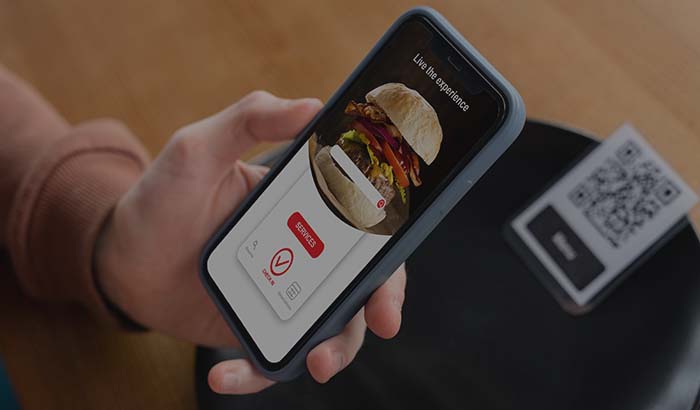
You stick a QR code on the side of the truck, on the counter or on the menu board. The customer scans the code with their phone and opens the menu without downloading any app. They see items with photos, choose a portion size, add an extra sauce and drop it in the cart. You need no card reader cart and no printed menu.
A QR e-menu is especially valuable for a food truck because you can update your menu in seconds. If the spicy chicken burger has sold out today, one tap marks it as unavailable, the customer never sees that item and no wrong orders come in. When you want to launch a new promotion, you do not have to print a new board to change the menu. You can find the logic of the QR menu in detail in our what is a QR menu article.

For those who want to make the menu visual, on the digital menu side you can arrange the photo, description and price on a single screen. A well-prepared visual menu noticeably raises the average ticket at a food truck; people add items more readily when they can see them with their own eyes.
Clearing the Queue With Queue Management and a Kitchen Display
The bottleneck at a food truck is the counter. You cannot cook while taking orders, and you cannot take orders while cooking. Online ordering paired with a queue number system separates the two. The customer places the order from their phone and gets a queue number, you focus on cooking. When their number is called, they come and pick it up.
Put a small tablet inside the truck and open the kitchen display system (KDS), and incoming orders drop onto the screen in sequence. Which order arrived when, how long it has waited, which one is ready; you see it all at a glance. The chaos of paper tickets, misread handwriting and forgotten orders disappears.
You manage all of the orders through your cloud POS and order ticket. Whether they come from a QR scan or you enter them by hand at the counter, they all collect on the same screen. During the rush you can hand a staff member an order-taking app and have them work the line taking orders; by the time the customer reaches the front, the order has already started being prepared.
Reaching Customers With Location Sharing and Delivery Zones
A food truck's biggest advantage is that it can move, but if the customer does not know where it is, that advantage is wasted. You share the link to your own ordering site and your daily location on social media, on your WhatsApp status or on your Google profile. People click the link, open the menu, see which spot you are at that day and put their order in.
If you deliver to a specific area, you define which addresses you ship to and the minimum cart amount with delivery zones. When you are parked at an event ground or a business campus, you can also run short-range delivery to nearby offices. You can manage order types flexibly; with pickup ordering the customer comes at the time they choose and picks it up without ever waiting in line.
You can see how all the order types work on the order types page. For a food truck, pickup and short-range delivery stand out the most; managing both from a single panel keeps operations simple.
Online Payment and Loyalty: Turning a One-Time Customer Into a Regular
Cash is a constant headache at a food truck. Hunting for change, the till that never has enough coins, the money exchange that slows the line down. With online payment the customer pays from their card while placing the order, and you just cook and hand it over. Cash traffic at the counter ends and the line moves far faster.
Most food truck customers look like one-time visitors, but with the right setup you can bring them back. With loyalty and promotions tools you define campaigns like 'a free drink on your fifth order' or 'ten percent off all wraps this week.' The customer comes back to you to build up points and follows your location on social media.
You track what you sell at which spot and which day each location performs best with cloud reports. When the data shows you that the coast road works on Friday evening and the business campus at Tuesday lunch, you plan your route accordingly and stop burning fuel for nothing.
From Setup to First Sale: Moving a Food Truck to Online Ordering
You need no technical knowledge to set the system up. You enter your menu, add the photos, connect your payment method and print the QR code to stick on the truck. You can be ready to take your first online order the same day. You can try the process risk-free with start free and test it during a real weekend shift.
The cost side is critical for a food truck. Working on a thin margin, you want a fixed and predictable expense, not a commission that melts away per order. On the pricing page you choose the plan that suits your business and see that your commission stays at zero no matter how many orders come in.
If you want to track recipes and costs alongside running the food truck, seeing clearly how much you earn from each item matters for the sustainability of the business. Our recipe and cost management article is a good starting point on this topic.
Key takeaways
- A marketplace takes 15 to 35 percent commission per order; on your own commission-free online ordering channel that money stays entirely in the food truck business.
- A QR menu is the most practical route for a mobile business; no app to download, the menu updates in seconds, and a sold-out item is marked unavailable instantly.
- Online ordering with a queue number system clears the line at the counter by separating order taking from cooking; a kitchen display system (KDS) keeps orders organized.
- Daily location sharing plus online payment turns the food truck's mobile nature into an advantage and ends the cash traffic at the counter.
- Cloud reports show which spot earns more on which day; you plan your route accordingly and avoid burning fuel for nothing.
Frequently asked questions
How do you set up an online ordering system for a food truck?+
You enter your menu and photos into the panel, connect your payment method and print your own QR code to stick on the truck. No technical knowledge is required, and you can take your first order the same day. With the start free option you can test it during a real shift.
Does the customer have to download an app?+
No. The customer scans the QR code with their phone camera and goes straight into the QR menu that opens in the browser. No app is downloaded. They place their order, pay from their card and get a queue number.
How much does a food truck save compared with a marketplace?+
A marketplace takes between 15 and 35 percent commission per order. For a food truck with 30 marketplace orders a day, that can add up to a substantial monthly expense. On your own commission-free channel that amount drops to zero and stays in the business.
How do I share my location when I have no fixed address?+
You share the link to your own ordering site and that day's location on social media, on your WhatsApp status or on your Google profile. The customer clicks the link and sees the menu and the location. With delivery zones you can also define short-range delivery addresses.
How do I manage the queue during the rush?+
Online ordering with a queue number separates order taking from cooking. The customer orders from their phone and gets a number while you focus on cooking. The kitchen display system (KDS) shows orders in sequence; if you like, a staff member can work the line taking orders with the order-taking app.
Stop paying commission on your orders
Launch your own commission-free online ordering system with RestApp.